A prototype can answer a tool call in minutes. A business service must also protect data, survive failures, explain its actions, and scale with demand. This guide helps teams build MCP servers and deploy them from a local project into a dependable production system.
Why Production MCP Servers Need a Plan
An mcp server gives an AI client access to tools, resources, or prompts through the Model Context Protocol. That access can be useful for customer support, finance, operations, and internal search. It can also create risk when a tool can read sensitive data or change a business record.
The move from development to production is not only a hosting decision. It is a change in responsibility. The team must define who can call each tool, what data may leave the system, how requests are logged, and what happens when an external service fails.
Production principle: Treat every tool call as an application request with an identity, a purpose, an authorization rule, and an observable result.
Start with a deployment map
List every client, server, API, database, secret, and business action before selecting MCP server hosting.
Review the deployment checklist
What the Top Technical Guides Do Well
The leading pages for “deploy MCP servers” are practical documentation resources. They do not begin with a hard sales pitch. They show developers how to create a server, configure a remote endpoint, run commands, and connect a client. These resources help developers understand how to build MCP servers and move from initial setup to reliable deployment. Their strongest CTA is the next useful technical action.
Protocol documentation
The official Model Context Protocol guide supports readers who want to create an mcp server and understand the server development flow. Its action is to continue building and testing.
Platform guide
The Cloudflare resource targets teams that need a remote mcp server. Its action path leads toward deployment, endpoint configuration, and platform use.
Cloud codelab
The Google Cloud guide turns deployment into a sequence of commands. Its action is to open a cloud project, configure security, and deploy a working service.
These CTA patterns match the audience. A developer searching for deployment help usually wants a command, a configuration example, or a safe next step. A button that says “Buy now” would interrupt the journey. A button that says “Deploy your first server” supports it.
The most effective CTAs in this SERP continue the implementation journey.
Define the Business Use Case First
Start with the business outcome, not the framework. A support agent may need to search approved knowledge articles. A sales agent may need account context from a CRM. An operations agent may need shipment status from a logistics API.
Each use case should have a narrow tool boundary. A support tool that retrieves an order should not also refund it unless the business has approved that action. Read operations are usually easier to launch. Write operations require stronger approval, audit, and rollback controls.
Write a tool contract
- State what the tool does in one sentence.
- List the required inputs and allowed formats.
- Define the identity used to access the backend.
- Describe success, failure, timeout, and retry behavior.
- Record whether the tool reads, creates, updates, or deletes data.
This contract helps product, security, and engineering teams review the same behavior. It also makes testing server tools more focused because each expected result is explicit.
Prepare the Project Directory and Server
Create a new project in a clean project directory. Keep the server code, dependency file, configuration file, tests, and deployment settings under version control. Do not store access tokens in the project directory or commit them to the repository.
The exact command depends on the SDK and language. A typical workflow is to create a new folder, initialize dependencies, add the mcp server implementation, and run it locally. Use the following command only after checking the package manager and runtime version used by your team.
mkdir business-mcp-server
cd business-mcp-server
run following command to initialize the project
Replace the example with the command for your selected SDK. The important practice is repeatability. A new engineer should be able to clone the project, install dependencies, configure a local environment, and start the server without manual fixes.
Keep configuration outside the file
Use environment variables or a managed configuration service for endpoint URLs, database names, feature flags, and token references. Separate development, staging, and production configuration. The application should fail safely when a required value is missing.
Pin dependencies and record the runtime version. A small version change can alter transport behavior, validation, or client compatibility.
A repeatable project directory makes deployment and maintenance easier.
Choose Cloud or Local Deployment
Local deployment is useful when data must remain on a controlled network, when a team is prototyping, or when an internal client runs beside the mcp server. It can reduce network latency and simplify access to private systems. It also places patching, uptime, logging, and capacity planning on the internal team.
Cloud deployment is often better when multiple clients need a remote mcp server, when traffic changes during the day, or when the organization needs managed identity, centralized logs, and automated scaling. Cloud hosting does not remove security work. It changes where the controls are configured.
| Deployment path | Best fit | Main concern |
| Local | Private networks, prototypes, controlled internal tools | Operations and remote access |
| Managed cloud | Remote clients, changing demand, distributed teams | Identity, cost, and data boundaries |
| Private cloud | Regulated workloads and hybrid systems | Platform complexity |
Choose the simplest environment that meets the risk and availability requirements. Do not select a platform only because it has a popular deployment command.
Compare your hosting path
Use the official remote deployment references to compare endpoint, identity, and operational requirements.
Review remote MCP hosting
Connect APIs and Databases Safely
An mcp server should act as a controlled gateway, not a general-purpose tunnel. Create a separate integration layer for each major system. Validate inputs before making an API request. Normalize responses so the AI client receives useful, bounded data.
API integration pattern
- Receive the tool request and validate its schema.
- Check the client identity and required permission.
- Translate the tool input into a safe backend request.
- Apply timeouts, rate limits, and response size limits.
- Remove secrets and unnecessary fields from the result.
- Return a clear success or error response.
Use service accounts with the smallest practical scope. Keep API keys in a secret manager. Do not allow a model-generated value to become an unrestricted URL, SQL fragment, shell command, or file path.
Database integration pattern
Prefer parameterized queries and approved stored procedures. Give the server a read-only database role when the use case only requires retrieval. For write operations, use transactions, idempotency keys, and explicit approval where appropriate.
Never expose raw database errors to an AI client. Log the technical error internally, then return a safe message that explains what the tool could not complete.
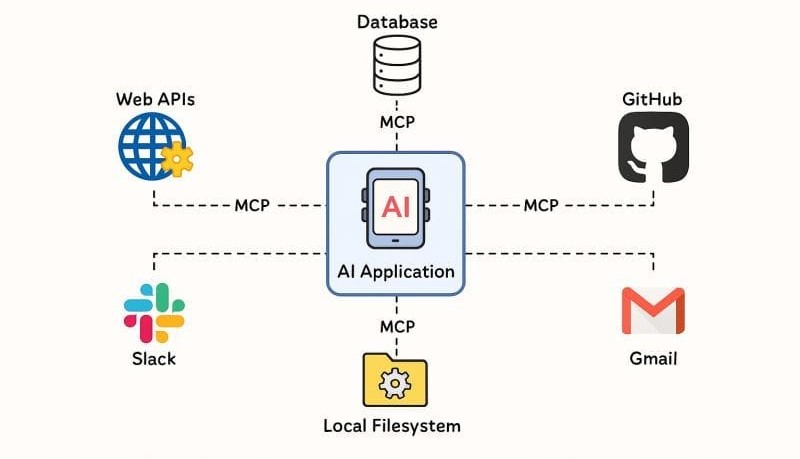
The server should enforce boundaries between clients and business systems.
Design Identity, Permissions, and Security
Authentication answers who is calling. Authorization answers what that caller may do. Both are required before an mcp server reaches production.
Use short-lived credentials where possible. Validate issuer, audience, expiry, and signature. Map user or workload identity to an explicit permission set. Avoid one shared token for every client because it makes investigation and revocation difficult.
Protect the tool boundary
- Allow only approved tools in each client configuration.
- Use allowlists for external hosts and backend operations.
- Limit request size, response size, and execution time.
- Redact credentials and personal data from logs.
- Require approval for sensitive write actions.
- Record the actor, tool, target, result, and timestamp.
Threat model prompt injection, confused-deputy behavior, excessive permissions, replayed requests, and compromised client configuration. The model is not a security boundary. The server and its backend controls must enforce policy.
Do not assume that a trusted AI client makes every tool call trustworthy. Validate every request at the server boundary.
Identity and authorization should be visible in the deployment design.
Set Up the Remote MCP Endpoint
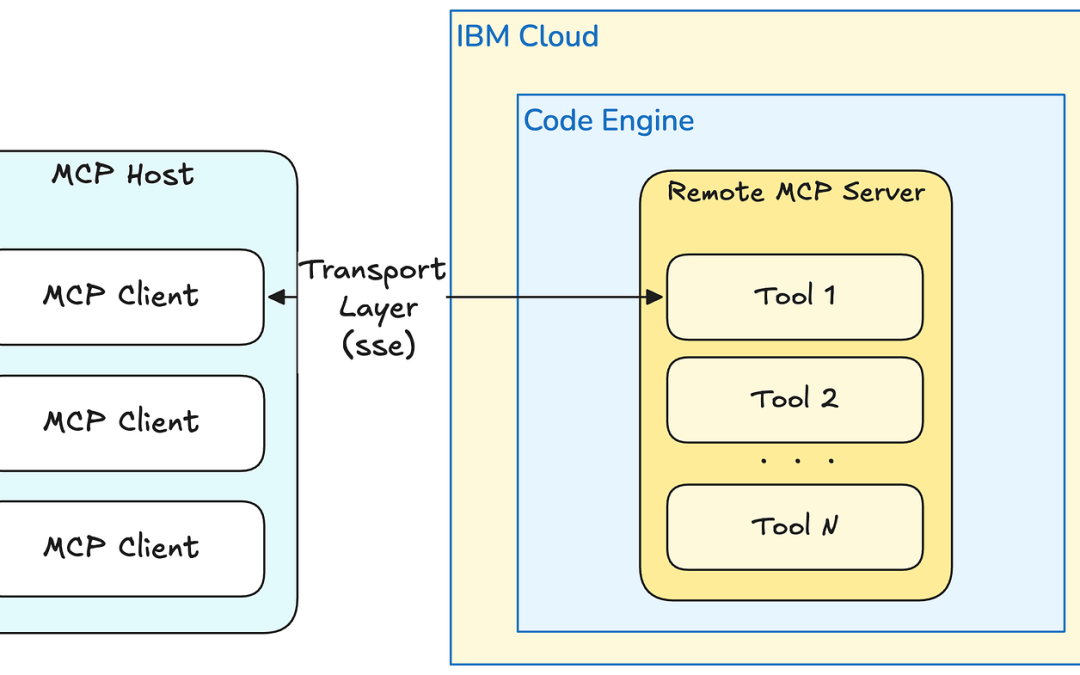
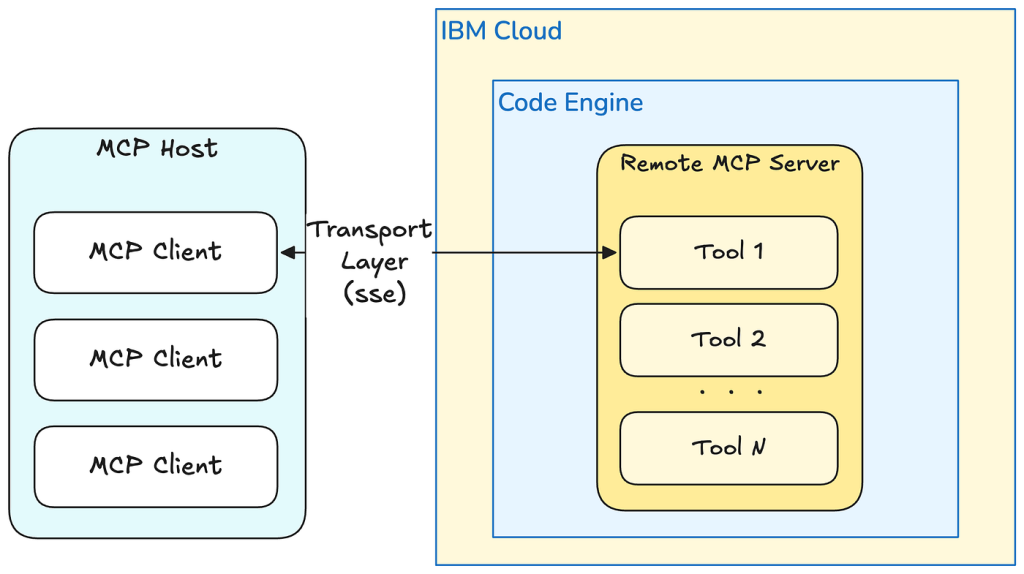
A remote mcp server needs a stable endpoint, supported transport, and clear connection configuration. Place the service behind TLS. Use a gateway or load balancer when you need centralized authentication, rate limiting, or network policy.
Keep public endpoint behavior narrow. Health checks should verify service readiness without exposing business data. A readiness check can confirm that required configuration and dependencies are available. A liveness check should show that the process can respond.
Document the endpoint URL, authentication method, supported protocol version, client requirements, and known limitations. This information reduces support requests when several teams connect different clients.
Client configuration
When a client such as Claude Desktop connects to a local server, its configuration commonly points to a command and arguments. For a remote mcp server, the configuration usually points to an HTTPS endpoint and an authentication flow. Follow the client’s current documentation because configuration fields can change by version.
{ "mcpServers": { "business-tools": { "url": "https://example.com/mcp" } }
}
After changing the configuration, restart Claude Desktop. A restart ensures the client loads the new server definition and exposes the current tools.
Test MCP Integrations Before Launch
Testing server behavior requires more than checking whether the process starts. Test the protocol, tool schemas, backend calls, permissions, failure paths, and client experience.
Build a layered test plan
Unit tests
Test validation, mapping, redaction, error handling, and business rules without calling live systems.
Integration tests
Call a controlled API or database and verify authentication, response shape, timeout handling, and retries.
Client tests
Connect a supported mcp client and verify tool discovery, arguments, results, and user-facing errors.
Include negative tests. Send missing fields, invalid types, oversized values, expired tokens, unknown tools, and duplicate requests. Confirm that the server rejects unsafe input without leaking internal details.
Use a staging environment that resembles production. Test with realistic response sizes and expected concurrency. If the application will support Claude Desktop, restart Claude Desktop after each relevant configuration change and confirm that the expected tools appear.
Validate before deployment
Use the official server-building reference to verify protocol behavior before connecting sensitive business data.
Open the server testing reference
Testing should cover both protocol behavior and business outcomes.
Deploy a Secure Cloud Service
Managed container platforms can reduce the work needed to run production MCP servers. A platform such as Cloud Run can provide a service endpoint, revision management, logs, and scaling controls. The team still owns application security, permissions, dependency choices, and data handling.
Package the server in a repeatable image. Use a small runtime image, a non-root process, pinned dependencies, and a clear startup command. Configure a port through the platform environment instead of hard-coding assumptions.
Use separate service identities for the mcp server and its deployment pipeline. Grant the runtime only the permissions needed to call approved APIs or retrieve selected secrets. Restrict who can deploy a new revision.
Deployment sequence
- Build and scan the container image.
- Publish the image to a controlled registry.
- Configure secrets, identity, network access, and environment values.
- Deploy a revision to staging.
- Run health, integration, and client tests.
- Promote the approved revision to production.
The Google Cloud codelab is useful when a team wants a guided example of secure deployment on Cloud Run. Use its commands as a learning path, then adapt them to your organization’s naming, identity, network, and release controls.
Follow a secure cloud deployment path
Use a guided Cloud Run example to understand the command sequence, then apply your own production controls.
Open the Cloud Run codelab
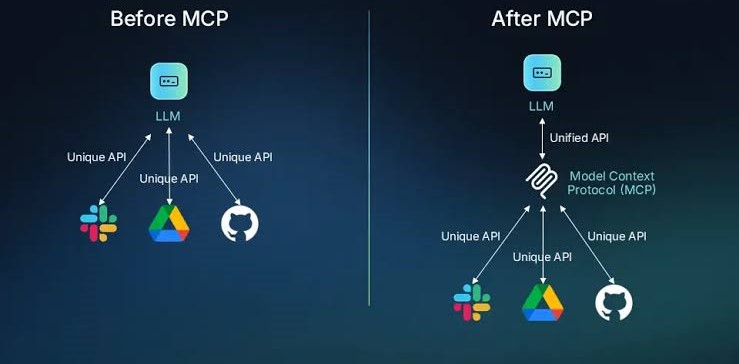
A staged release reduces risk when deploying a new server version.
Monitor and Maintain the Server
Monitoring tells the team whether the service is available, useful, safe, and affordable. Track request volume, latency, error rate, timeout rate, tool-level failures, authentication failures, and dependency health.
Use structured logs with a request ID. Include the server version, tool name, duration, status, client type, and backend dependency. Do not record raw secrets, complete prompts, or unnecessary personal data.
Define operational alerts
- Alert when availability falls below the service target.
- Alert when latency increases for a critical tool.
- Alert on repeated authentication or authorization failures.
- Alert when a dependency returns sustained errors.
- Alert when cost or request volume changes sharply.
Maintenance includes dependency updates, protocol version reviews, certificate rotation, secret rotation, access audits, and removal of unused tools. Create a rollback plan before a release. Keep the previous working version available until the new version is verified.
Operational dashboards should show both service health and tool behavior.
Scale MCP Servers Reliably
Scaling depends on the type of work performed by each tool. A fast read from a cached service may scale with ordinary stateless instances. A long report, file operation, or transactional workflow may need a queue and background worker.
Keep the request layer stateless when possible. Store session or job state in a managed system rather than local memory. Set concurrency limits based on backend capacity, not only on server CPU.
Plan for growth
- Measure normal and peak tool call volume.
- Set per-client and per-tool rate limits.
- Use queues for slow or retryable work.
- Cache safe, short-lived reference data.
- Protect databases with connection pool limits.
- Test scale-out and scale-down behavior.
Autoscaling can increase cost or overload a downstream system if limits are missing. Use backpressure and clear retry rules. A client should not repeat a write request unless the operation is idempotent.
Review scaling assumptions
Before increasing capacity, identify the slowest tool, the most expensive dependency, and the strictest backend limit.
Use the readiness checklist
Business Use Cases for AI Agents
MCP integration for businesses is valuable when an agent needs controlled access to systems that already contain useful information. The server provides a consistent tool boundary while the business keeps authority over identity, policy, and data.
Customer support
Read account status, order history, and approved knowledge content. Keep refunds, cancellations, and account changes behind stronger permissions.
Sales operations
Retrieve CRM context, summarize recent activity, and prepare follow-up tasks. Require confirmation before creating or changing customer records.
Finance and operations
Collect reporting data, check invoice status, and compare inventory signals. Enforce strict access controls for payments and financial records.
Start with one measurable workflow. For example, a support agent could reduce the time needed to find an order status from several minutes to a few seconds. Define the baseline, measure tool accuracy, and review human escalation rates.
Business value comes from focused workflows with clear permissions.
Connect Clients Such as Claude Desktop
Claude Desktop can be useful for local development and controlled internal testing. The client configuration identifies the mcp server command, arguments, or remote endpoint. Keep local configuration separate from production configuration.
After editing the configuration file, restart Claude Desktop. If the server does not appear, check the project directory, command path, runtime version, environment variables, and terminal output. Then confirm that the server process can start without the client.
Common client checks
- Confirm the server name is unique.
- Confirm the command points to the intended file.
- Confirm dependencies are installed in the expected environment.
- Confirm the tool schema loads without errors.
- Restart Claude Desktop after configuration changes.
- Run one safe read-only tool call before testing writes.
Use a remote mcp endpoint when the business needs centralized policy, shared access, or cloud monitoring. Do not expose a local development server directly to the public internet.
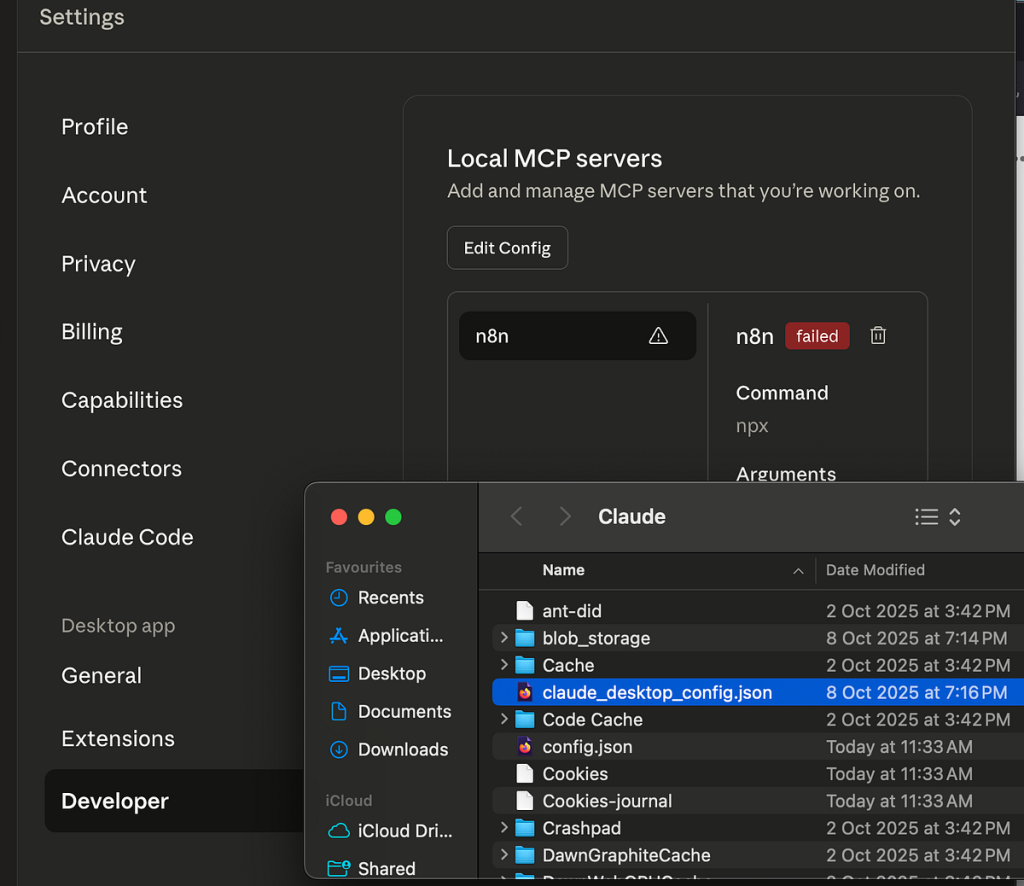
Local clients are useful for controlled testing before remote deployment.
Production Deployment Checklist
Use this checklist before the deployed mcp server handles real business requests.
- Tool contracts are documented.
- Inputs and outputs are validated.
- Timeouts and error paths are tested.
- Dependencies and runtime versions are pinned.
- Authentication and authorization are enforced.
- Secrets are stored outside the project file.
- Write actions have approval or policy controls.
- Logs redact sensitive information.
- Health checks and alerts are configured.
- Rollback and restart procedures are documented.
- Capacity and rate limits are tested.
- A maintenance owner is assigned.
A shared checklist turns deployment knowledge into an operating standard.
Request a production-readiness review
Use this form when your team needs a structured review of architecture, security, testing, or MCP server hosting choices.
Start the readiness review
Prepare Your Implementation Review
A short review request should collect enough context to make the next conversation useful. Ask for the deployment environment, primary business use case, number of expected clients, and the systems the server must access. Business emailDeployment environmentPrimary integration need
Include the main API, database, client, or security question your team needs to resolve.Submit review request
Final Recommendations for Deployment Teams
To deploy MCP servers successfully, begin with a narrow business workflow and a clear tool contract. Teams that build MCP servers should create the server in a repeatable project directory, keep secrets out of source files, connect APIs through controlled adapters, and give databases the least privilege required.
Select local deployment for controlled development or private network needs. Select cloud MCP server hosting when several clients need a managed remote endpoint, centralized logs, or flexible capacity. In either case, treat authentication, authorization, testing, monitoring, and maintenance as part of the application.
The strongest CTA for this topic is practical because the audience is practical. Invite readers to check their architecture, follow a trusted deployment guide, test one safe tool call, and confirm production readiness. That path aligns with the successful technical pages in the SERP while giving business teams the structure needed to move from an experiment to dependable production MCP servers.
A disciplined release path connects development work to measurable business value.